
The short answer
A photo from a recent phone is really two pictures in one file: an ordinary image, plus a gain map that tells an HDR screen how much brighter each area is allowed to go. Your camera roll shows the combination. Highlights sit above normal white, and the whole picture looks brighter and livelier than any ordinary photo could.
Instagram does not always show that combination. When it shows only the ordinary image — in the upload preview, after an edit, or because the gain map was lost on the way — you see the photo without the extra brightness you were used to. That difference is the darkening.


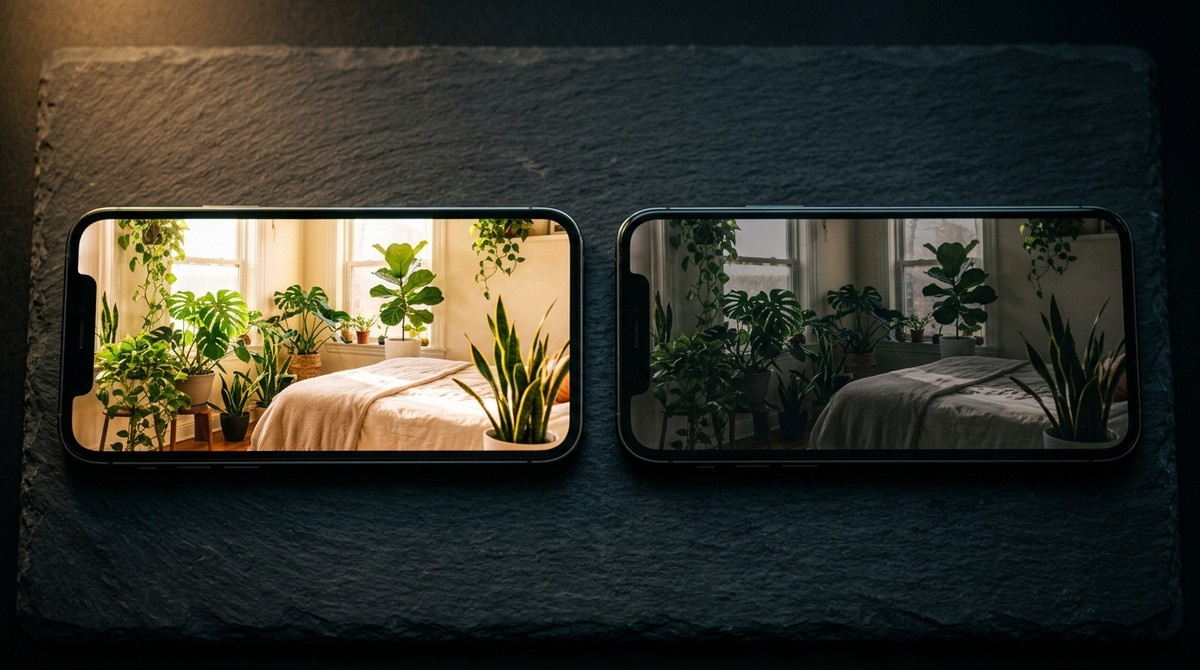
Simulated. On the screen you are reading this on, both halves are identical — an ordinary display has no extra brightness to give. This is how the difference reads on an HDR display.
Why it happens the moment you tap to post
The camera roll and the Instagram composer are rendering different things. The first shows the HDR version at full strength; the upload screen often shows the ordinary one. Seen side by side within a second, the drop is dramatic, even though the ordinary image was in the file all along.
It is also why the effect seems to have started suddenly for a lot of people. Nothing changed in how they shoot. A phone or app update began showing HDR in the camera roll, so the gap between what they see there and what they see everywhere else appeared overnight.
What makes Instagram lose the HDR
Sometimes the preview is only a preview, and the post itself still shows HDR once it is live. Sometimes the gain map really is gone. The common causes are edits Instagram has to re-encode: cropping to anything other than the original ratio, resizing, and some filters and adjustments. HDR photographer Greg Benz, who tracks this closely, also reports that uploading from an iPhone costs noticeably more quality than uploading the same file from a computer.
These rules change with app updates, and nobody outside Meta has a complete list. The reliable test is the file, not your eyes: download the post back and check whether a gain map is still inside it.
Why it can look worse than an ordinary photo
If the result were simply your photo without the HDR boost, it would look like any other photo in the feed. Often it looks worse than that — crushed shadows, muddy midtones. That happens when the ordinary version is regenerated from the HDR one by software that does not squeeze the range down gracefully, or when an image prepared for your phone's wider colour space is converted carelessly on the way.
The fix is the same in both cases: give Instagram an ordinary image you have already judged yourself, rather than letting it make one.
When it goes the other way: too bright
The opposite complaint has the same cause. If the gain map survives, your photo shows in the feed with HDR brightness next to posts that have none, and it can look harsh or blown out — especially in a dark room, where the phone has the most brightness in reserve.
It can also be down to how you edited. Editing at full screen brightness, or on an HDR screen while viewers look at ordinary ones, makes a photo look different to everyone else than it did to you.
How to fix it
See what your audience sees before you post. On an iPhone, switching off View Full HDR under Settings, Photos makes your camera roll show the ordinary version. If you edit with that switched off, there is no sudden drop when you tap to post, because you were already looking at the picture Instagram will show.
That is probably also why Low Power Mode is a popular fix. With it on, the phone shows ordinary versions everywhere, so the camera roll and the upload preview match. It does not change the file you upload; it changes what you see.
If you want to keep the HDR, post at the original aspect ratio and avoid cropping or re-editing inside Instagram. Then download the live post and check it.
How to post on Instagram without HDR
Instagram has no setting that makes your uploads ordinary. Its Disable display of HDR media option only changes what you see on your own phone; your followers still get the HDR file.
To send an image without a gain map, you have to remove it before upload. The crude but dependable way is a screenshot of the photo, which is saved as an ordinary image; it loses some resolution. The cleaner way is to export from an editor such as Lightroom with HDR output switched off and the colour space set to sRGB.
For new photos, the switch is in the camera settings where the phone offers one. Recent iPhones always capture HDR data, so for them exporting is the answer rather than a setting.
Frequently asked questions
How do I stop Instagram from darkening my photos?
Edit and judge the photo with HDR display switched off — View Full HDR under Settings, Photos on an iPhone — so you are looking at the version Instagram will show. Or post an image with no gain map at all, exported from an editor with HDR off.
Why does my photo go dark when I tap to post?
The camera roll shows the HDR version of the photo; the upload screen usually shows the ordinary one. The sudden change is the difference between the two, not something Instagram did to your photo at that moment.
Does Low Power Mode really fix dark Instagram photos?
It makes the phone show the ordinary version everywhere, so the camera roll and the upload screen match and the drop disappears. It does not change the file you post.
How do I post on Instagram without HDR?
Remove the gain map before uploading: post a screenshot of the photo, or export it from an editor with HDR output off and sRGB colour. Instagram itself has no upload setting for this.
Can I turn off HDR on Instagram?
For viewing, yes: the iPhone app has a Disable display of HDR media option under Media quality in its settings. Restart the app after changing it. It only affects what you see, not what you upload.
Why are my photos so bright on Instagram?
The gain map survived, and your photo is being shown with HDR brightness next to posts that have none. It is most noticeable at low screen brightness in a dark room.